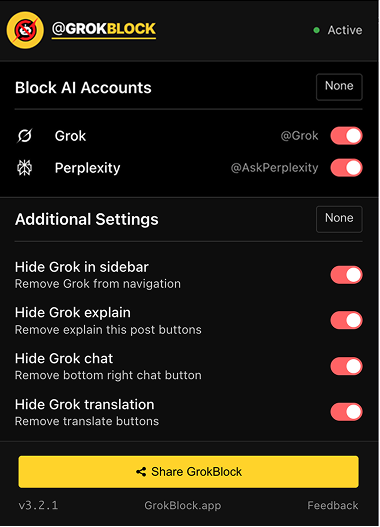
One install removes every reply from AI accounts.
The same feed, with the AI replies gone. There are no mute lists to build and no allowlists to maintain, and real human replies stay untouched.


@mentions
Hides every reply that tags an AI account, along with the thread under it.
sidebar
Removes the Grok widget from the sidebar and returns the column to your feed.
translate
Removes the AI translate prompt that appears under foreign-language posts.
explain
Removes the “explain this post” button from every post.
“Replies on X used to be people talking to people. Then @grok started answering under every popular post, and muting or blocking couldn’t remove it. I built GrokBlock to put the humans back.”
Why not just mute or block the bots?
Muting hides a bot’s profile, but its replies still appear in threads under other people’s posts, and muted keywords leave “this post is muted” markers behind. Blocking is a losing race, because new AI accounts appear faster than you can block them. And X’s quality filter can’t be told that the problem is specifically AI replies. GrokBlock targets exactly that.
How does GrokBlock remove AI replies and mentions?
It scans the page for patterns like @Grok and @AskPerplexity and hides those replies and mentions from view. It doesn’t block any accounts; it removes the noise you don’t want to see, and the rest of the page stays untouched.
Will I miss anything important?
No. The extension only hides replies that tag AI accounts and removes Grok’s UI elements. Real human replies, posts, likes and notifications all stay.
Does it slow down X?
No measurable impact. The extension runs locally in your browser, only inspects elements as they render, and batches its work to avoid jank.
What permissions does it need?
Site access for x.com and twitter.com, so it can modify the page you’re viewing. There is no broad or cross-site access and no data collection.
Which browsers are supported?
Chrome and Firefox, from their official stores. Chromium-based browsers like Brave, Arc and Edge can install the Chrome version. Safari isn’t supported.
Does it track me?
No. It runs locally in your browser and doesn’t log, upload or share anything.
What if I want Grok back?
Open the extension popup and flip any toggle off. Each control is independent. Uninstall anytime, and X returns to its default state immediately.